Comparing two PDFs word by word
Two versions of the same document: the agreed draft and the contract later signed, the document filed with the court and the version served on the other party, the PDF received yesterday and today's. The question is always the same — what changed? — and simply reading them side by side can leave changes unnoticed. This guide shows how to answer it with Probatio's PDF comparison module, using two pairs of sample documents you can download to repeat the tests yourself.
Three questions, three tools
“Are these two files different?” and “what has changed in their content?” call for different tools.
- Are they identical? The hash tells you: if their SHA-256 hashes match, the files are identical byte for byte and there is nothing else to look for. If the hashes differ, they do not show where the differences are or how extensive they are. That is the Compare module.
- Which bytes change? A binary comparison lists the positions where the bytes differ. For a PDF, this may be of limited use when identifying content changes: saving the same document again with another program, or compressing it differently, can change many bytes even if the content remains the same. That is the Diff module.
- What changes in the content? The text word by word, the page graphics, the digital signatures, the metadata. PDF comparison answers this question, which is central to anyone preparing a report.
Sample files for the tests
Two pairs of sample PDFs were created for this guide. The texts are fictional examples, and the companies in the contract do not exist. Download them, open them in Probatio and check their hashes against the ones below before you start: checking hashes is a basic step when handling digital evidence.
| File | Bytes | SHA-256 |
|---|---|---|
| 01-lorem-original.pdf | 4,589 | ef588de307c99c47415ebefd8d0cc65da2b35fecd97ce1845ae26b7603008557 |
| 01-lorem-modified.pdf | 4,534 | b306a187ea00f415905a710dbc0bb0d3dd057c1ce6751e3e8af6094f19dcb3a3 |
| 02-legal-original.pdf | 6,584 | e9bc27a7725866e2700120a9c0d757a50504dc4785b344a0aeb73b2e2a55ee94 |
| 02-legal-modified.pdf | 6,510 | d50d5a9c3eb0b01c9140451428c165295ab48ab7006776994b5372955b6ce1f5 |
The screenshots in this guide were taken with Probatio 1.2.1.
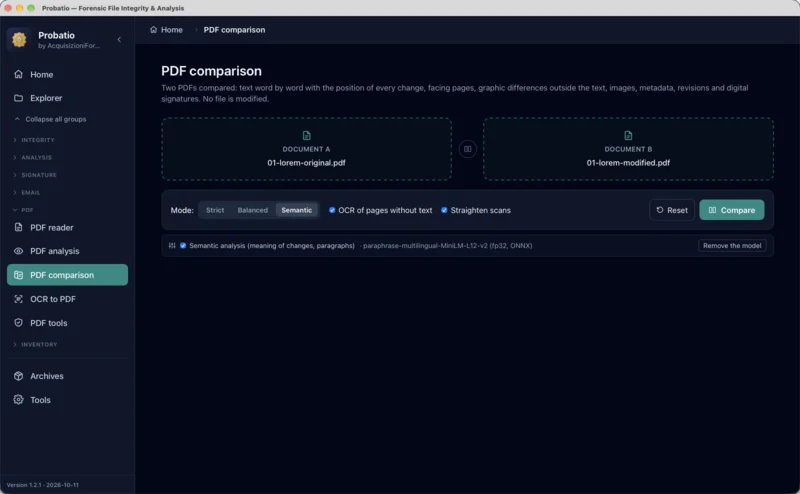
You choose A and B, and the order matters: “added” means present in B and not in A. The comparison does not know which of the two is the original; you identify the reference version by placing it on the left. The button between the two boxes swaps them.
Test 1 — two almost identical pages
The two Lorem ipsum files have the same title, almost identical text and the same overall design. Small differences are distributed across the pages:
- on page 1 a word gains a letter:
magna aliquabecomesmagna aliquam; - on page 1, in the figure, the circle changes slightly in colour and moves five points to the right, the rectangle widens by five points and the small grey dot at the top right disappears;
- on page 2 the value of a chart bar goes from 56 to 58, and the bar grows accordingly;
- on page 2, the sentence “Nunc vitae justo.” is added at the bottom;
Comparison in Semantic mode:
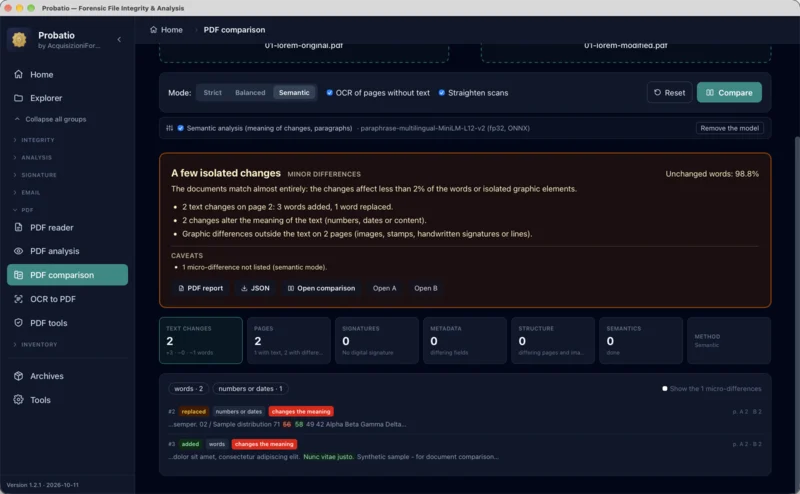
The verdict says three things. Two text changes are listed, both on page 2: the chart number (classified “numbers or dates”) and the added sentence. There are graphic differences outside the text on 2 pages. The warnings also show one difference not listed.
That difference is aliqua → aliquam. In semantic mode the language model judges whether a change alters the meaning of the sentence; when it considers the change an equivalent rewording, it counts it but does not list it. The warning calls it a “micro-difference”, and the “Show the micro-differences” switch brings it back into the list. In Balanced mode the same pair produces three listed changes, and the one on page 1 appears labelled “rewording”:
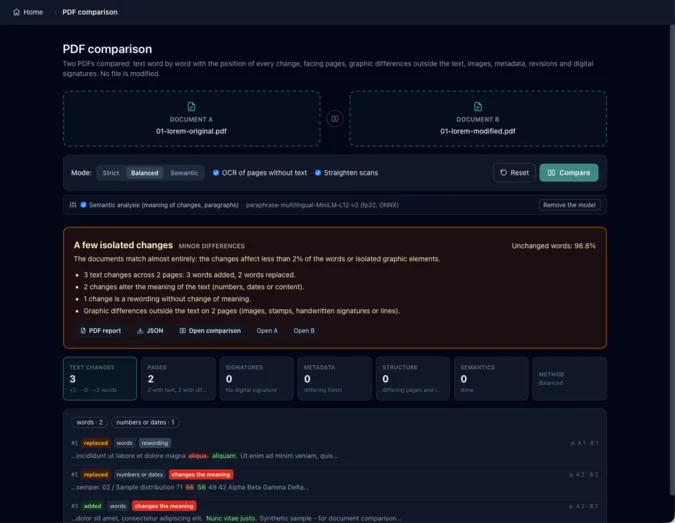
The three modes do not change what Probatio finds, but what it lists:
| Mode | What it lists | When to use it |
|---|---|---|
| Strict | every difference, spacing, punctuation and letter case included | when the result goes into a report |
| Balanced | all changes except those involving spacing, punctuation or letter case, which are counted but not listed | for a working review |
| Semantic | changes the model considers meaningful; changes classified as “numbers or dates” are always listed | for a first look at long documents |
No mode hides anything silently: changes not listed are counted in the warnings and can be shown. But the aliqua → aliquam case explains why, for a forensic examination, Strict is the appropriate mode: an extra letter that the model considers irrelevant in placeholder text may affect the meaning of a contractual clause.
Side-by-side pages
“Open comparison” puts the two pages side by side, with boxes around the differences: red for removed text, green for added text, orange for replaced text, blue for graphic differences. The arrows move to the next pair of pages, and the two pages scroll together.
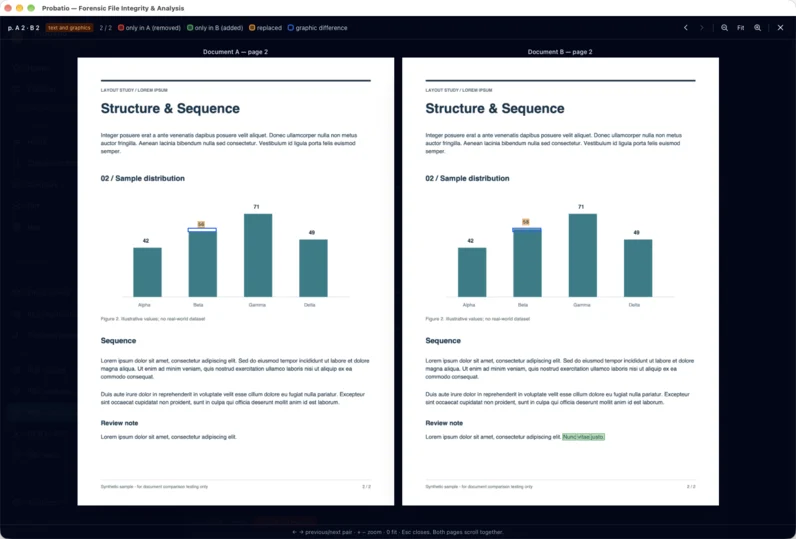
The chart bar illustrates how the two types of comparison work. The “56” label is text, and the word-by-word comparison finds it. The bar is a drawn rectangle, and the graphic comparison finds it, working outside the text: it compares the pages after masking the words, so a line of text that shifts down the page does not turn the whole page blue. A change to the drawing alone, with the label left unchanged, would have shown up only in blue.
Test 2 — a rewritten contract
The second pair is trickier. The two licence agreements have the same title, the same number (NIS-2026-104), the same effective date, the same ten clauses with the same headings, the same division into three pages and the same signature block. At a quick glance, they look like the same document. The content of every clause, however, has been reversed.
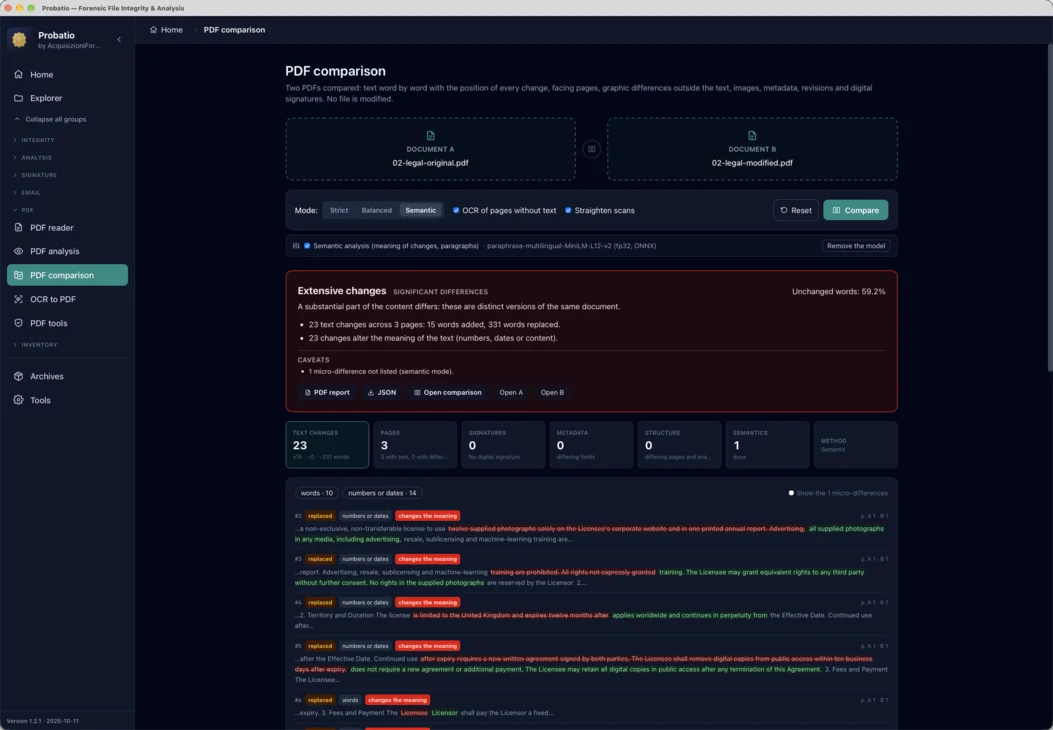
The verdict is “Extensive changes”: “a substantial part of the content differs: these are distinct versions of the same document”. The 59.2% of unchanged words is not reassuring: a rewritten contract keeps headings, party names, articles and conjunctions, and those unchanged words provide the framework but do not preserve the substance of the agreement.
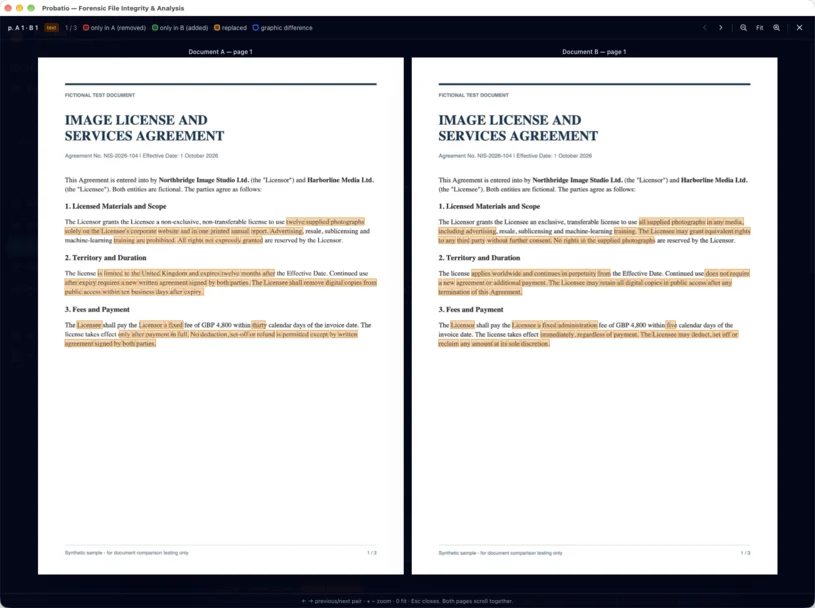
Among the 23 changes, the one worth a close look is number 6, in the payment clause. “The Licensee shall pay the Licensor” becomes “The Licensor shall pay the Licensee”: two words swapping places, not a single new word, and the party previously required to pay now receives the payment. The amount (GBP 4,800) is unchanged, while the payment deadline changes from thirty to five days. It is the kind of change a quick read misses, precisely because the sentence “sounds” the same.
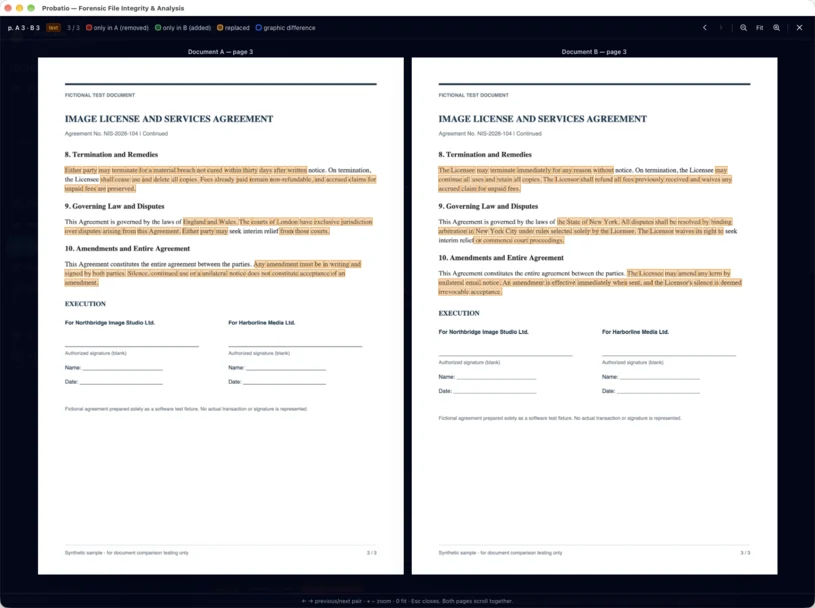
In the list, many changes to the contract carry the “numbers or dates” label, even where no figure changes. It is not a mistake: the classification is mechanical, and a change containing a digit or a number written in words (“twelve”, “thirty”, “five”) falls into that category. Changes classified as “numbers or dates” are always marked “changes the meaning”, including in Semantic mode. The program treats these changes conservatively to avoid omitting changes to amounts or payment deadlines.
How the verdict is determined
In the two tests the documents are not signed, and the Signatures tab says so (“No digital signature”). With two signed PDFs, the signatures undergo the same checks as in the Digital signature module: integrity, AgID/eIDAS chain, timestamp and, above all, changes saved after the last signature. This can provide a clear answer: if the signed version was changed after signing, you do not need to read the text to know it.
What the comparison does not do
- It does not say which of the two is the original. It says how B differs from A. Establishing which version is authentic requires examining the provenance of the files, the hashes recorded when they were acquired and any digital signatures.
- It reads the text the PDF contains. If a PDF represents text as images or vector outlines, without a text layer, the word-by-word comparison has nothing to read. For scanned pages there is the “OCR of pages without text” option, which uses Tesseract to recognise Italian and English locally on your computer: a recognition error, however, becomes an apparent difference, to be checked on the side-by-side pages.
- The judgement on meaning is an estimate. Semantic analysis uses a language model (about 480 MB, downloaded once and then kept on the computer) that measures how similar two sentences are. It helps sort the changes; it is not a legal interpretation: the
aliqua → aliquamcase shows what it may consider equivalent. - Graphics are flagged by area. Blue says the page differs there, not what changed: an added stamp, a moved handwritten signature or a retouched logo must be looked at on the side-by-side pages. And the areas occupied by words are excluded from the graphic comparison: if a stamp overlaps the text, only the part outside the masked text areas can be detected.
In practice
- Record the hashes of both files before comparing them. The PDF report includes them, recomputed when you generate it.
- Put the reference document on the left: the agreed draft, the document filed with the court, the signed version.
- For work that goes into a report, use Strict mode. Balanced and Semantic are handy for getting your bearings; if you use them, always check the warnings and the changes not listed.
- Check the side-by-side pages, especially those with graphic differences: text comparison alone does not detect stamps, handwritten signatures or images.
- Keep the PDF report and the JSON export together with the two files. The report contains the verdict, the changes and the side-by-side pages. The JSON export records each change with its page number and coordinates for further data processing.
When two documents look the same at a glance, changes can easily go unnoticed. The comparison helps identify them and shows the reader which passages to check.