PDF documents

OCR to PDF

OCR to PDF turns scans, photos of documents, multi-page TIFFs and scanned PDFs into a PDF whose text can be searched, selected and copied. Every page goes through four steps, in this order: straightening (perspective correction of skewed photos or deskewing of scans, with corners adjustable by hand), automatic orientation, image isolation (photos, stamps, logos, which are not mistaken for text) and text recognition with Tesseract 5. Everything happens on the computer; for damaged prints and handwriting a local vision model can re-read the page.

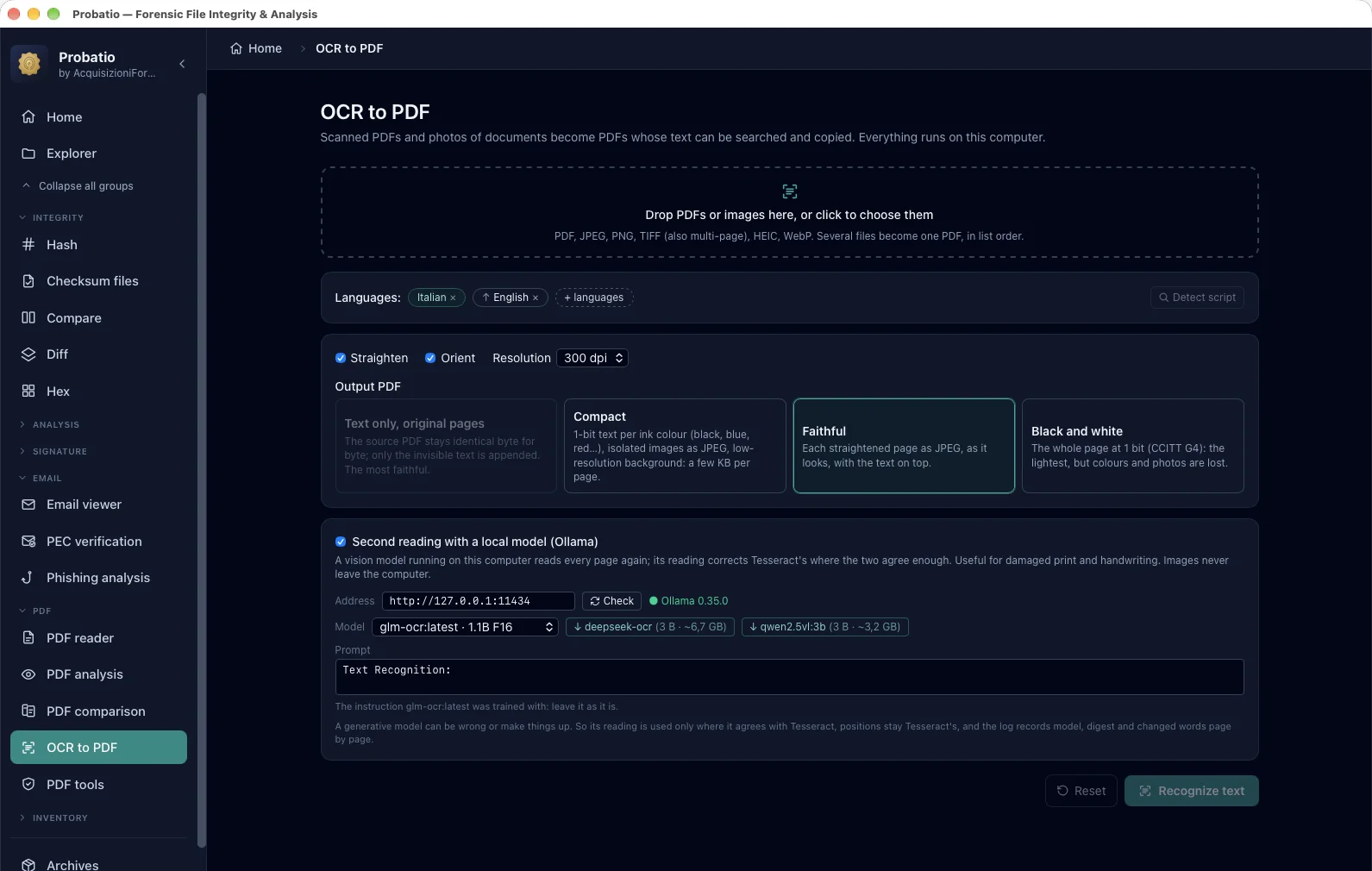
The OCR to PDF module: Italian and English languages, straightening and orientation on, the four output modes with Faithful selected, re-reading with a local model served by Ollama on 127.0.0.1
Languages, straightening and orientation, the four output modes and the optional re-reading with a local model (Ollama on 127.0.0.1): the page image never leaves the computer.
What it does

What the OCR to PDF module does

122 languages, also together

Italian and English are included; the other 120 languages are downloaded once, with hash verification, and then stay on the computer. Probatio recognises the page's script (Latin, Cyrillic, Arabic, Greek, Chinese…) and suggests the right languages.

Straightening and orientation

A sheet photographed in perspective becomes rectangular again, a skewed scan straight, an upside-down or sideways page is turned. Automatic straightening is designed to apply only to documents, not to ordinary photos.

Re-reading with a local model

Optional: a vision model served by Ollama on your computer re-reads each page and corrects Tesseract. Probatio only accepts a local address, so images never leave the machine. The model's text is used only where it agrees with Tesseract and never on a blank page, because a generative model can make things up.

Four ways to save

Faithful: the original image, and an untouched JPEG enters the PDF identical byte for byte. Compact: crisp text and separate figures, a much smaller file. Black and white: the lightest, for text only. Text only: adds the text to the original PDF without touching it, which stays intact at the start of the new file.

Warns when the source is poor

If the image has low resolution, Probatio warns that “Faithful” will stay grainy and suggests the modes that redraw the text crisply. Pages of a PDF that are already digital, with real text, are not redone.

Work window

Progress, pages, a preview with words coloured by confidence, recognised text and an activity console, in a window of its own.

Only what you choose is saved

The PDF and, on request, the text (.txt) and the log (.ocr.json) with the files' hashes and, for every page, straightening, rotation, languages, confidence and the local model used, with the number of words changed.
Step by step

How it works

  1. Add scanned PDFs, photos or TIFFs: from the sidebar or with a right click from Explorer.
  2. Choose the languages, the save mode and, if you wish, re-reading with the local model; check the corners of straightened pages.
  3. Start and follow the pages in the work window, then save the PDF, with text and log if you need them.
FAQ

Frequently asked questions

Are the pages sent to an online service?
No. Recognition with Tesseract runs on the computer. The optional re-reading uses a model served by Ollama on the same computer: Probatio only accepts a local address. Only the language files go over the network, downloaded once and checked against their hash.
Does the original PDF stay intact?
With “Text only”, available when the input is a single PDF, yes: the text is appended and the source file stays identical at the start of the new one. With “Faithful” an untouched JPEG goes in identical byte for byte; a straightened or rotated page is a new image instead, and the log says so.
Can the local model make up text?
A generative model can, which is why Probatio uses its text only where it agrees with Tesseract's and never on an almost blank page. The log records, for every page, the model used, with its digest, and how many words it changed.